当你把 AI agents 从 prototype 推向 production 时,infrastructure 挑战会成倍增加。你的 agents 需要在运行数小时或数天的 multi-step workflows 中持久化 state。它们需要与其他 agents 协调、共享 context,有时还需要访问 GPUs 来处理专门任务。Amazon Bedrock AgentCore runtime microVMs 为最长可运行 8 小时的 invocations 提供了全托管环境,并通过托管 session storage 支持 stateful workflows。有些 workloads 还受益于专用、更大容量的环境——例如,当 agents 需要连续运行多天、访问 GPUs 或底层 OS,或在同一 host 上运行多个协作 agents 时。
今天,我很高兴宣布 runtime instances,这是 Amazon Bedrock AgentCore Runtime 中一个新的补充性 compute 选项,为你的 agents 提供持久、托管的基础设施,专为复杂的 agent workloads 构建。
你会得到什么
Runtime instances 提供 AWS 托管的 EC2 infrastructure,让你在单个 runtime 中部署多个 agents,每个 agent 都有自己的 dependencies 和 artifact types。你的 agents 可以在同一 host 上、在最长持续 14 天的 shared sessions 中协作。该服务支持 GPU 加速来处理 compute-intensive 任务,支持 session stop/restart 以在 idle periods 节省成本,还支持 containerized deployments,便于团队独立交付。对于需要在 session 之外长期保留的知识,runtime instances 与 Amazon Elastic Block Store (Amazon EBS) 和 AgentCore Memory 自然配合,后者让你的 agents 在 sessions 和 environments 之间拥有长期记忆。
在今天之前,如果你想让 agents 连续运行数天,或它们需要 GPU 访问,或需要 multi-agent coordination,你必须自己构建和管理这些 infrastructure。你需要 provision EC2 instances、配置 networking、设置 session management、处理 scaling,并把 monitoring 拼凑起来。Runtime instances 为你处理所有这些,同时与你已在 AgentCore Runtime microVMs 中使用的相同 AgentCore APIs、identity controls 和 observability 集成。
还有一些会让 agent developers 高兴的事情:你的 agents 可以在 shared session 中作为 tools 互相调用,自主迭代直到任务完成。你可以使用任何 framework(CrewAI、LangGraph、LlamaIndex、Strands)和任何 model。打包非常简单,只需一个 @app.entrypoint decorator 和一个 zip file 或 container image。如果你的 workflow 跨越数天,你可以周一晚上 hibernate,周三早上 resume,一切保持原样。
Runtime microVMs 和 runtime instances 是互补的 compute 选项,你可以通过相同的 AgentCore runtime APIs 单独或组合使用它们。运行在 runtime microVM 上的轻量级 orchestrator agent 可以协调工作,并将其分派给运行在 instances 上的专用 worker agents。orchestrator 利用 runtime microVM 的快速 scaling 处理 API calls、task routing 和 result aggregation,而 instances 上的 workers 则执行需要 persistent state 和直接 OS 访问的 compute-intensive 任务,例如 code compilation、security scanning 或 GUI automation。
让我展示一下它是如何工作的我为这个 demo 构建了两个 agents:一个 code writer agent,根据 natural language 描述生成 Python code;一个 code reviewer agent,分析生成的 code,查找 bugs、security issues 和 style improvements。两个 agents 共享同一个 file system,因此 reviewer 可以读取 writer 生成的任何内容,而无需在它们之间进行任何 data transfer 或 API calls。
以下是 code writer(简化版,无 error handling):
writer = Agent(
    model="us.anthropic.claude-sonnet-4-5-20250929-v1:0",
    system_prompt=(
        "You are a senior Python engineer. "
        "Given a task, return ONLY a single Python code block — no prose."
    ),
)

@app.entrypoint
def handler(event, context):
    task = event.get("task") or event.get("prompt")
    session_id = getattr(context, "session_id", None) or event.get("session_id")
    session_dir = SHARED_DIR / session_id
    session_dir.mkdir(parents=True, exist_ok=True)

code = str(writer(task))
    (session_dir / "code.py").write_text(code)

return {"agent": "writer", "wrote": str(session_dir / "code.py"), "code": code}
以下是 code reviewer agent(简化版,无 error handling):
reviewer = Agent(
    model="us.anthropic.claude-sonnet-4-5-20250929-v1:0",
    system_prompt=(
        "You are a strict Python code reviewer. "
        "Given code, return 3 bullet points: bugs, style, suggestions."
    ),
)

@app.entrypoint
def handler(event, context):
    session_id = getattr(context, "session_id", None) or event.get("session_id")
    code_path = SHARED_DIR / session_id / "code.py"
    code = code_path.read_text()
    review = str(reviewer(f"Review this code:\n\n{code}"))

return {"agent": "reviewer", "read": str(code_path), "review": review}
每个 agent 都是一个 Python application,使用 Strands Agents,带有 @app.entrypoint decorator 和自选的 model。我将每个 agent 打包为一个 zip file。对于这个 demo,我使用 AWS Management Console。你也可以使用 AgentCore CLI、AWS Command Line Interface (AWS CLI) 或 infrastructure as code。
步骤 1:创建 capacity provider。
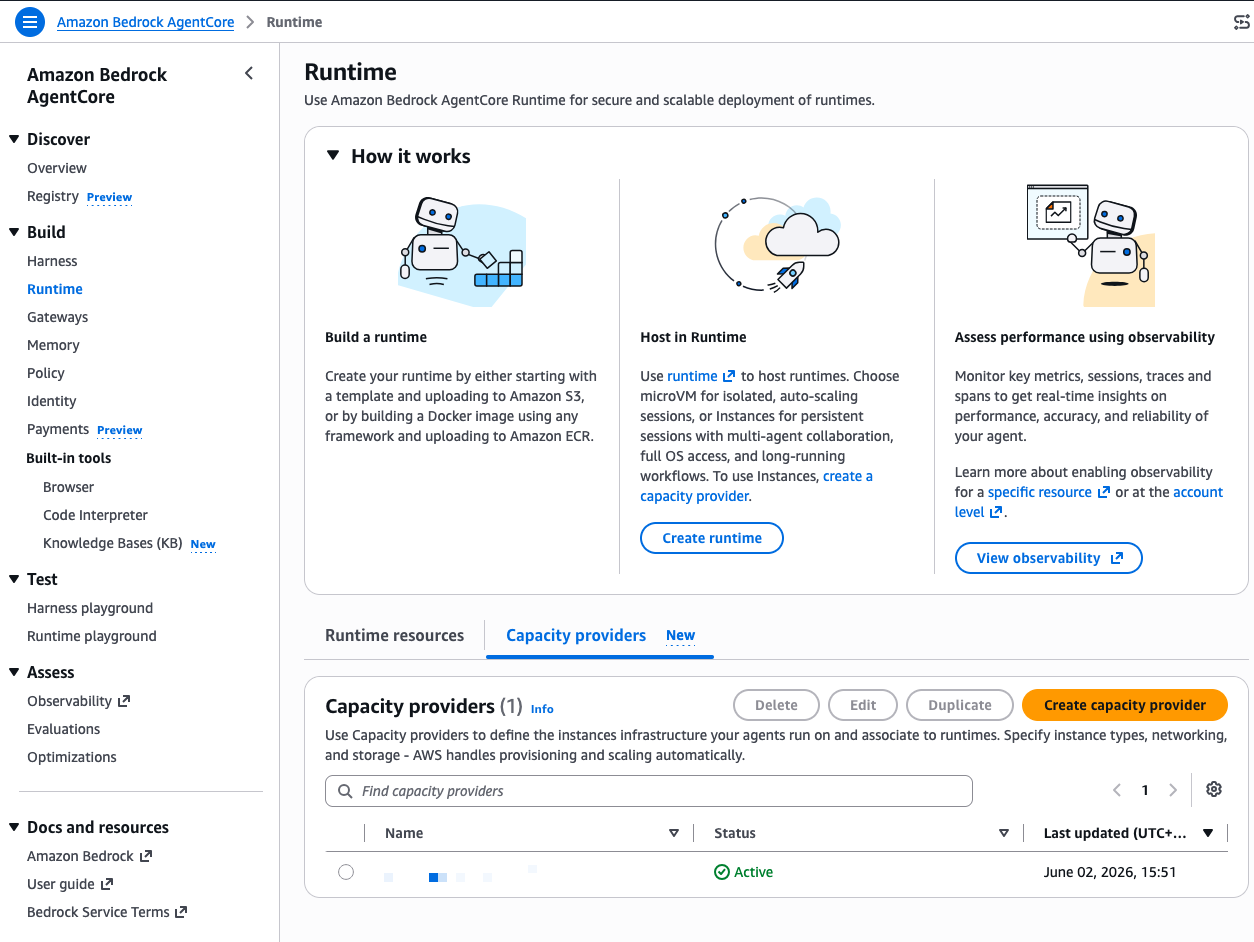
capacity provider 定义了你的 agents 运行所在的 EC2 infrastructure。在 AgentCore 控制台中,我在左侧导航中选择 Runtime,然后选择 Capacity providers 选项卡,再选择 Create capacity provider。
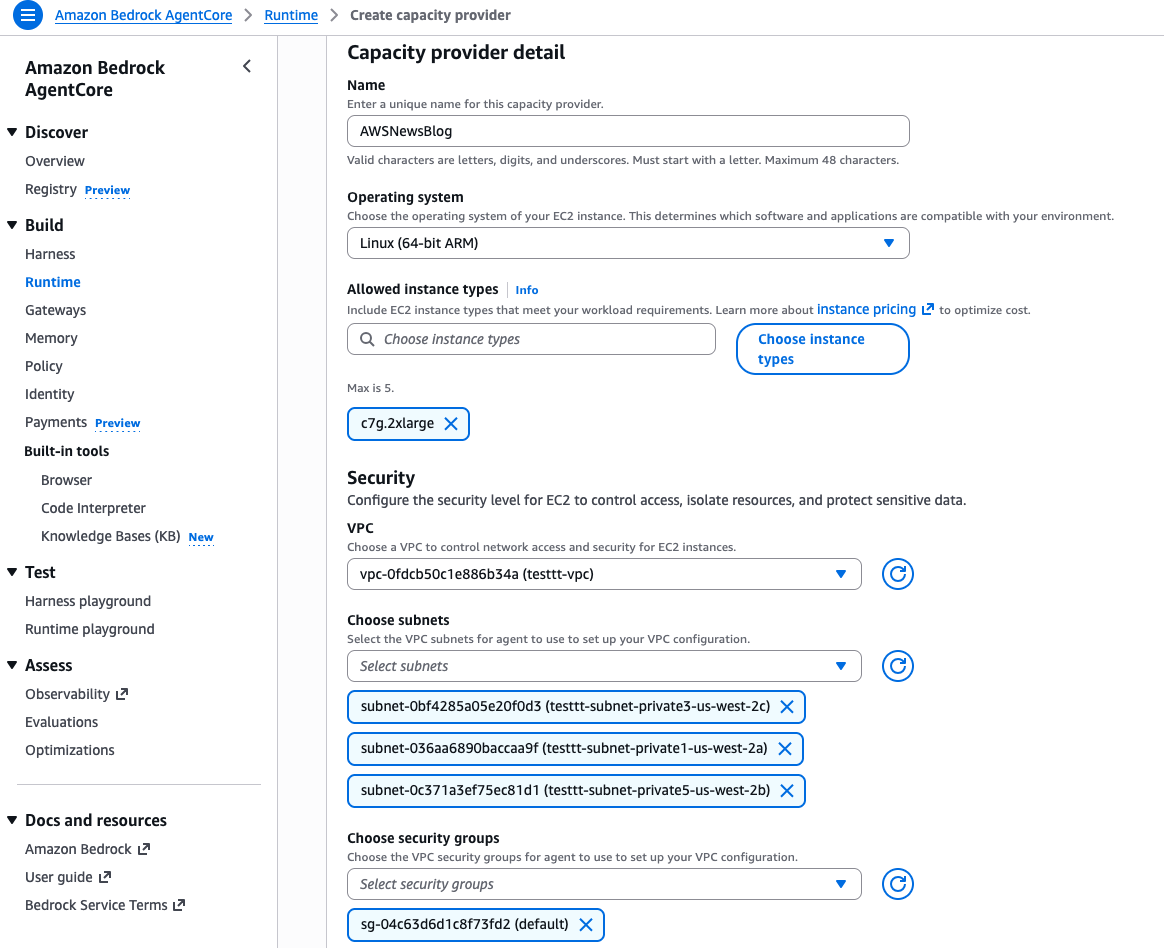
我给它一个 Name,选择 Linux (64-bit ARM) 作为 Operating system,并选择 c7g.2xlarge 作为 Allowed instance types。这为我提供 8 个 vCPUs 和 16 GiB 内存,足以让两个 agents 舒适地并行运行。
再往下,我配置 VPC、subnets 和 security groups 以进行 network access。在 Storage configuration 下,我保留默认的 gp3 volume。在 Service access 下,我选择 Create a new service role,让控制台创建代表我管理 EC2 instances 的 infrastructure role。
我选择 Create capacity provider,然后等待几秒钟。状态变为 Active。
请注意 capacity provider 配置摘要:operating system、instance type、subnets、security group、instance profile 和 infrastructure role。创建后,只有 description 可以编辑,所以请在继续之前确认你的设置。
步骤 2:创建 runtime 并部署第一个 agent。
回到 Runtime 页面,我选择 Create runtime。我给它一个 Name,选择 Instances 作为 Compute type,并选择我在上一步创建的 Capacity provider。
在 Agent source 下,我选择 S3 Source,然后选择 Upload to S3。我选择我的 agent zip file(ACIDemoWriter.zip),将 Language runtime 设置为 Python 3.13,并将 agent.py 指定为 Agent entry point。这个文件包含我使用 @app.entrypoint 装饰的 function。在 Permissions 下,我选择 Create default role,让控制台 provision 我的 agent 所需的 IAM role。
我选择 Create runtime,然后等待状态变为 Ready。
我对 code reviewer agent 重复相同的过程。我创建第二个 runtime,选择相同的 capacity provider,上传 reviewer agent zip file,然后等待它变为 Ready。现在两个 agents 共享相同的底层 EC2 infrastructure。
控制台显示一个 View invocation code 部分,其中包含可直接使用的 Python、TypeScript 和 JavaScript 代码片段,用于以编程方式调用我的 agent。但对于这个 demo,我使用内置的 test 功能。我在 writer agent 页面上选择 Test。
步骤 3:调用 agents 并观察协作。
Runtime playground 打开。在顶部,我看到三个字段:Runtime agent、Endpoint 和 Session ID。控制台会自动生成一个 session ID。我记下它,因为我将在 reviewer agent 中复用它。
在 Input 字段中,我输入一个 JSON payload,要求 writer agent 生成代码:
{"prompt": "write a fibonacci suite"}
我选择 Run。几秒钟后,Output 面板显示 agent 的响应。writer agent 生成了一个 Python module,其中包含 Fibonacci sequence 的两种实现(一个基于列表的 function 和一个 generator),并将其写入 /tmp/agentcore-session/ca5ec24d-07f5-4eeb-add1-5ba416bf9eb2/code.py。请注意 file path 中的 session ID。该目录就是这个 session 的共享 file system。
步骤 4:在同一 session 中调用 reviewer agent。
现在我将 Runtime agent 下拉框切换为 ACIDemoReviewer。关键点:我在 Session ID 字段中粘贴相同的 session ID(ca5ec24d-07f5-4eeb-add1-5ba416bf9eb2)。正是它将两个 agents 连接起来。
我输入一个简单的 prompt:
{"prompt": "review the code"}
我选择 Run。reviewer agent 从共享 session 目录读取 writer 生成的 file,并返回一份详细的 code review。它没有发现 critical bugs,但建议添加 type hints、input validation,并简化 edge case handling。
这两个 agents 从未交换消息,也没有调用彼此的 APIs。它们通过 runtime instances 在 session 内提供的共享 file system 进行协作。你可以将这种模式扩展到任意数量的 agents:一个运行 code 的 test agent、一个生成 README files 的 documentation agent、一个扫描 vulnerabilities 的 security agent,它们都共享同一个 working directory。
关键细节
以下是你开始使用时需要了解的一些事项:
- 支持的 OS:launch 时支持 Linux(ARM64 和 x86_64)。
- Session persistence:Sessions 最多持久化 14 天。
- Runtimes:Python 3.11-14,支持 native code。也支持 container images。
- GPU:支持 GPU-accelerated instance types。
- Integration:使用与 AgentCore Runtime 相同的 AgentCore APIs、identity、observability 和 policy controls。
- Pricing:标准 EC2 pricing 加上 AgentCore orchestration 的管理费。
- Regions:US East (Ohio, N. Virginia)、US West (Oregon)、Asia Pacific (Mumbai, Singapore, Sydney, Tokyo) 和 Europe (Frankfurt, Ireland)
要开始使用,请访问 Amazon Bedrock AgentCore documentation并创建你的第一个 capacity provider。
— seb
来源:AWS Blog

